Table Of Content
- 🎉 Exclusive Deals & Massive Savings
- Why Starting a WordPress Website Matters
- Step 1: Choose a Domain Name
- Step 2: Select a WordPress Hosting Plan
- Step 3: Set Up and Install WordPress
- Step 4: Choose a Theme and Customize Your Website
- Step 5: Add Essential WordPress Features
- How Bluehost Fits the Beginner Website Setup Process
- Pricing and Important Considerations
- Pros and Cons of Using Bluehost
- Pros
- Cons
- 💎 Premium Hosting Deals & Special Offers
- Frequently Asked Questions
- Is WordPress free to use?
- How much does it cost to start a WordPress website?
- Can a beginner use Bluehost with WordPress?
- Do I need coding skills to start a WordPress website?
- Can I create an online store with WordPress?
- Related Resources
- Conclusion
Learning how to start a WordPress website can feel complicated when you are a complete beginner. You need a domain name, web hosting, a website platform, a design, and a clear plan for publishing your content. The good news is that these steps can be broken into a simple process.
In 2026, WordPress remains a flexible option for creating blogs, business websites, portfolios, and online stores. Bluehost is one hosting provider that offers WordPress-focused plans and tools designed to simplify the setup process. This guide explains the main steps involved, what beginners should consider before choosing a plan, and how to move from an idea to a published website.
🎉 Exclusive Deals & Massive Savings
Why Starting a WordPress Website Matters
A website lets you share content, showcase services, and build your online presence.
WordPress is popular because it can be customized with themes and plugins. Beginners can start with a relatively simple website and make changes as their needs develop. Before getting started, however, it helps to understand the basic pieces involved.

Most new websites need:
- A domain name
- Web hosting
- A website platform
- A theme or design
- Essential pages and content
- Basic security and performance settings
Planning these elements before purchasing anything can help you choose tools that match your actual requirements.
Step 1: Choose a Domain Name
Your domain name is your website’s address, such as yourbrand.com. A good domain should generally be easy to remember, easy to spell, and relevant to your website or brand.
When choosing a domain, consider:
- Keeping it reasonably short
- Avoiding unnecessary numbers or special characters
- Choosing a name connected to your topic or business
- Checking whether the name is available on relevant platforms
Bluehost currently offers a free domain for the first year with eligible 12- or 36-month hosting terms, subject to its domain policy and eligible extensions. Renewal costs and domain availability should always be checked before completing your purchase.
Step 2: Select a WordPress Hosting Plan
Web hosting stores your website files and makes your website available online. The right plan depends on the type of website you want to create and the resources you expect to need.
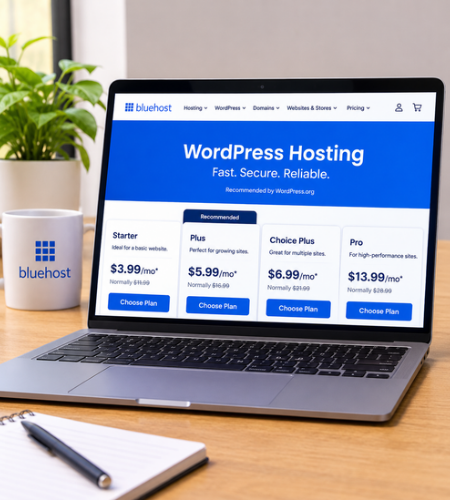
Bluehost offers several WordPress hosting plans to suit different website needs. Its entry-level Starter plan starts at $3.99 per month with a 36-month term, while higher plans include additional resources and features. Since promotional and renewal prices may change, check Bluehost’s current pricing before purchasing.
When comparing hosting plans, look beyond the introductory price. Consider:
- Storage capacity
- Number of websites supported
- Security features
- Backup options
- Customer support
- Renewal pricing
- Whether the plan fits future growth
Step 3: Set Up and Install WordPress
After choosing hosting, the next step is setting up your website.
Bluehost provides WordPress installation and website setup tools through its account portal. According to Bluehost’s current guidance, users can add a website from the Websites section and configure their WordPress installation through the portal.
During setup, you will generally choose important details such as:
- Your website name
- Your domain connection
- Basic website preferences
- Your WordPress installation settings
Once WordPress is installed, you can access the WordPress dashboard and begin building your website.
Step 4: Choose a Theme and Customize Your Website
A WordPress theme controls much of your website’s visual appearance. Beginners should focus on a clean, responsive design rather than choosing a theme simply because it has many features.
Start by creating the pages most visitors expect, such as:
- Home
- About
- Contact
- Blog or services page
- Privacy Policy
You can then customize your site’s colors, typography, menus, and layout.
If you are building a blog, create a clear category structure before publishing many posts. If you are creating a business website, focus on making it easy for visitors to understand what you offer and how they can contact you.
Step 5: Add Essential WordPress Features
Plugins can add functionality to a WordPress website, but installing too many unnecessary plugins may make website management more complicated.
Useful categories may include:
- SEO tools
- Security tools
- Backup tools
- Contact forms
- Performance optimization
- Analytics
Bluehost’s current WordPress plans include features such as managed WordPress updates, SSL, CDN access, security tools, and weekly backups, depending on the plan and current offering. Review the exact features of your selected plan before relying on a specific tool.
How Bluehost Fits the Beginner Website Setup Process
For beginners who prefer managing several website essentials in one account, Bluehost combines hosting with WordPress-focused tools and setup resources.
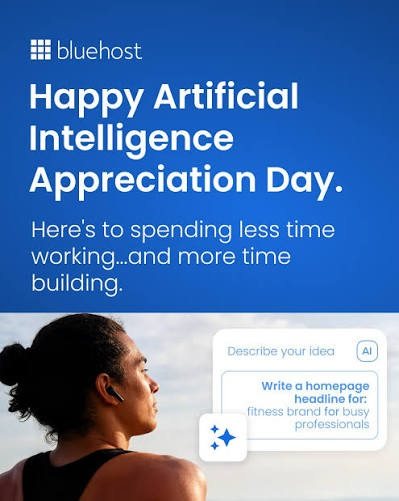
Its current offerings include WordPress hosting plans with features such as a free domain for the first year on eligible terms, free SSL, AI-powered site creation tools, and support options. Bluehost also provides official setup guides covering domains, hosting, website building, security, and launching.
The platform may be particularly useful for people who want a guided starting point instead of separately managing every technical component from different providers.
Pricing and Important Considerations
Hosting prices often depend on the billing term and promotional offers. Bluehost currently displays introductory pricing separately from renewal pricing, so it is important to review both before making a long-term commitment.
Bluehost also states that eligible hosting plans include a 30-day money-back guarantee, with specific conditions and exclusions. Domain-related fees and other add-ons may be handled differently, so readers should review the official terms carefully.
Pros and Cons of Using Bluehost
Pros
- WordPress-focused hosting options
- Beginner-oriented setup tools
- Free SSL included with current plans
- Free domain for the first year on eligible terms
- Multiple plans for different website needs
- Official WordPress setup resources
Cons
- Introductory and renewal prices are different
- Long-term pricing should be reviewed carefully
- Advanced users may prefer more specialized hosting configurations
- Features can vary between plans
💎 Premium Hosting Deals & Special Offers
Frequently Asked Questions
Is WordPress free to use?
The WordPress software itself is generally free, but you still need hosting and usually a domain name to publish a self-hosted website online.
How much does it cost to start a WordPress website?
The total cost depends on your hosting plan, domain, premium themes, plugins, and optional services. A basic website can cost less than a complex business or eCommerce website.
Can a beginner use Bluehost with WordPress?
Bluehost provides WordPress setup tools and official guides intended to help beginners through the website creation process.
Do I need coding skills to start a WordPress website?
No. Many WordPress themes and website tools allow beginners to create pages without writing code.
Can I create an online store with WordPress?
Yes. WordPress can support online stores through eCommerce tools such as WooCommerce. Bluehost also offers plans with eCommerce-focused features.
Related Resources
Before choosing a hosting plan, it can also help to compare pricing, features, and the overall value of the provider. Our detailed Bluehost reviews, pricing, and plans guide for 2026 explains additional considerations for people evaluating Bluehost for a new website.
Conclusion
Starting a WordPress website in 2026 does not require advanced technical knowledge, but choosing your domain and hosting carefully is important. Begin with a clear purpose, select a suitable hosting plan, install WordPress, create essential pages, and test your website before publishing it.
For beginners who want WordPress-focused hosting and a guided setup process, Bluehost may be worth exploring. Review the current plans, features, promotional pricing, and renewal costs on the official website before deciding which option fits your website goals.