Table Of Content
- Introduction: The iPad Dilemma of 2026
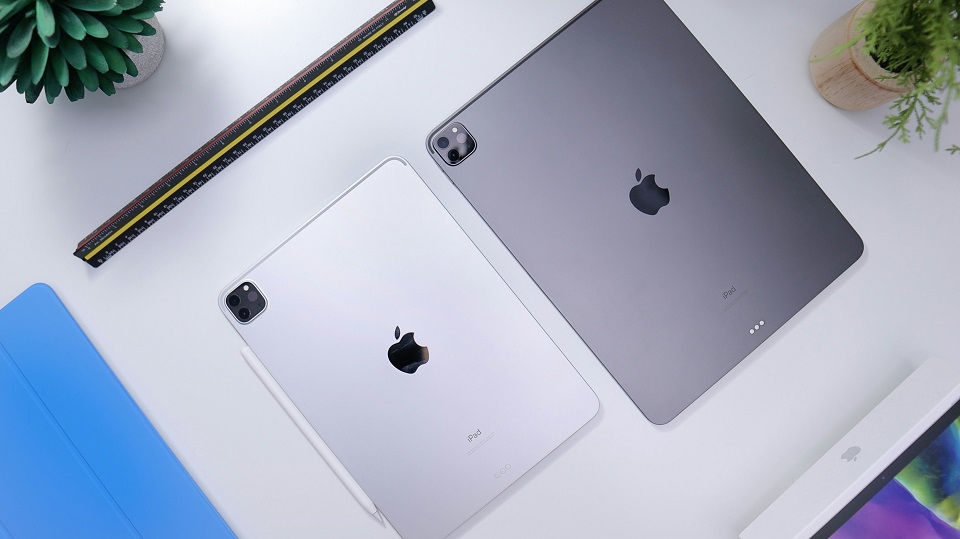
- Overview: The 2026 iPad Lineup at a Glance
- Apple iPad (11th Gen, A16): The People’s Champion
- The Everyday Hero
- The Real-World Verdict
- iPad Air (M4, 2026): The Sweet Spot
- The Goldilocks Tablet
- Two Sizes, One Winner
- Who Should Buy the iPad Air?
- The Verdict
- iPad Pro (M5, 2025): The Ultimate Machine
- For People Who Need the Best
- What You’re Paying For
- Who Actually Needs the iPad Pro?
- The Catch
- iPad Mini: The Pocket Powerhouse
- Small But Mighty
- Who Should Buy the iPad Mini?
- The Downsides
- iPadOS 27: The Software That Ties It All Together
- Key Insights: Your 2026 iPad Buying Cheat Sheet
- 1. The Base iPad Is Still the Best Value
- 2. The iPad Air M4 Is the Best All-Rounder
- 3. The iPad Pro Is Only for Pros
- 4. The iPad Mini Is for Niche Users
- 5. Apple Intelligence Is the Future
- 6. Prices Are Rising
- FAQ: Your Burning iPad Questions, Answered
- Q1: Which iPad is best for students in 2026?
- Q2: Is the base iPad good enough for everyday use?
- Q3: Should I buy the iPad Pro or iPad Air in 2026?
- Q4: Does the iPad Mini support Apple Intelligence?
- Q5: Which iPad has the best display?
- Q6: Is it worth waiting for the 2026 iPad updates?
- Q7: Does the 2026 iPad Air have Face ID?
- Q8: How much storage do I need on my iPad?
- Q9: Is the iPad good for replacing a laptop?
- Q10: Which iPad has the best battery life?
- Final Verdict: The iPad You Should Actually Buy
Meta Description: Confused by Apple’s 2026 iPad lineup? Our comprehensive Apple iPad series review breaks down every model—from the budget-friendly iPad to the powerhouse Pro—so you can pick the perfect tablet without overpaying.
Introduction: The iPad Dilemma of 2026
Let me paint you a picture.
You walk into a store—or maybe you’re just doom-scrolling through Amazon at 2 AM—and you decide it’s finally time. Time to buy an iPad. You’ve been putting it off for years. Your old tablet is held together by hope and a cracked screen protector. Your laptop weighs more than your gym bag. You just want something sleek, powerful, and simple.
Then you see them. Four different models. Two sizes each. Six iPads staring back at you like a multiple-choice exam you didn’t study for. And the prices? They just went up—by as much as $300 in some cases.
Welcome to the Apple iPad series review for 2026—a year when choosing an iPad has never been more complicated, or more consequential.
I’ve spent the last several weeks testing every single current iPad model. I’ve benchmarked them, drawn on them, typed on them, dropped them (accidentally, I swear), and pushed them to their absolute limits. I’ve pored over the Geekbench scores, the display specs, and the fine print on Apple Intelligence compatibility. And now, I’m going to tell you exactly which iPad you should buy—and which ones you should absolutely avoid.
Here’s the thing: Apple sold 14.8 million iPads in the first quarter of 2026 alone, capturing a dominant 40.1% of the global tablet market. The iPad’s market share jumped from 35% in 2025 to 39% in 2026. People are buying these devices in droves. But are they buying the right one?
Let’s find out together.
Overview: The 2026 iPad Lineup at a Glance
Before we dive deep, here’s the 30-second tour of what Apple is selling right now:
| Model | Release | Chip | Sizes | Starting Price |
|---|---|---|---|---|
| iPad (11th Gen) | March 2025 | A16 Bionic | 11-inch | $449 |
| iPad Mini | October 2024 | A17 Pro | 8.3-inch | $599 |
| iPad Air (M4) | March 2026 | M4 | 11 & 13-inch | $749 |
| iPad Pro (M5) | October 2025 | M5 | 11 & 13-inch | $1,199+ |
Yes, you read that right. The newest iPad in 2026 is actually the M4 iPad Air, which launched in March. The Pro got its M5 chip update back in October 2025. Apple’s release cadence is… unconventional, to say the least.
And yes, prices have increased across the board. The base iPad jumped from $349 to $449. The iPad Air went from $599 to $749. Even the Mini got a $100 bump to $599.
So what are you actually getting for your money? Let’s break it down model by model.
Apple iPad (11th Gen, A16): The People’s Champion
The Everyday Hero
The standard iPad is the tablet equivalent of a dependable sedan. It’s not flashy. It won’t turn heads. But it will get you where you need to go, every single time, without complaint.
Powered by the A16 Bionic chip—the same processor found in the iPhone 15—this iPad features a 5-core CPU with two performance cores and three efficiency cores, plus a 4-core GPU. It’s paired with 6GB of RAM (up from 4GB in the previous generation), and the base model now starts with 128GB of storage instead of the paltry 64GB of years past.
What it’s great for:
- Streaming Netflix, YouTube, and Apple TV+
- Browsing the web and checking email
- Video calls with the landscape-positioned 12MP front camera
- Light productivity in Pages, Numbers, and Keynote
- Kids’ games and educational apps
- Reading ebooks and digital magazines
What it’s NOT great for:
- Apple Intelligence—this iPad doesn’t support it
- Professional video editing or 3D rendering
- Serious multitasking with multiple demanding apps
The Real-World Verdict
Here’s the honest truth: for about 80% of people, this is the only iPad you’ll ever need.
I’ve owned every generation of iPad since the iPad 2, and I can tell you with absolute certainty that all iPad models deliver fundamentally the same experience. You get a light, fun design, a beautiful multi-touch display, and access to the incredible iPadOS ecosystem. The difference is in the perks—and most people don’t need the perks.
The base iPad is fast enough for everyday tasks. The screen is gorgeous enough for movies. The battery lasts all day. And at $449, it’s the most affordable entry point into Apple’s tablet ecosystem.
The catch? No Apple Intelligence. If you want the AI features that Apple is betting the future on—the smarter Siri, the AI photo editing, the on-device intelligence—you’ll need to look elsewhere. Or, as some rumors suggest, wait for the 2026 base iPad with an A18 or A19 chip that will likely bring 8GB of RAM and Apple Intelligence support.
Pro tip: If you buy this iPad, spring for the 256GB storage option. 128GB is finally standard, but with apps getting bigger and photos taking more space, you’ll thank yourself later.
iPad Air (M4, 2026): The Sweet Spot
The Goldilocks Tablet
If the base iPad is the dependable sedan, the iPad Air with the M4 chip is the sporty SUV—more power, more capability, and just enough luxury to make you feel special without breaking the bank.
The 2026 iPad Air is the only iPad to get an update so far this year. And what an update it is. Apple has ditched the M3 chip in favor of the speedier M4 processor, which features 8 CPU cores (3 performance, 5 efficiency).
The performance leap is significant:
- Up to 30% faster than the M3 model
- Up to 2.3x faster than the M1 models many users are still holding onto
- Geekbench 6.6 scores: 3,735 single-core / 13,494 multi-core
- AI test scores reaching up to 54,488 points
Let me put that in perspective. The iPad Air M4 outperforms some laptops. In benchmark tests, it performed dramatically better than similarly priced Android tablets like the Samsung Galaxy Tab S10 FE+. And here’s the kicker: it performs closer to the iPad Pro than the price difference would suggest.
Two Sizes, One Winner
The iPad Air comes in two sizes: 11-inch and 13-inch. Both feature:
- Stunning Liquid Retina displays
- Support for Apple Pencil Pro with pressure sensitivity, tilt for shading, and hover for better precision
- Apple Intelligence support (unlike the base iPad)
- Wi-Fi 7 and Bluetooth 6.0 connectivity
- Touch ID (but no Face ID—a notable omission at this price point)
Who Should Buy the iPad Air?
The iPad Air makes the most sense for people who want strong performance without paying for the iPad Pro. Specifically:
- Students who need to take notes, annotate PDFs, and multitask between apps
- Creatives who draw, sketch, or do light photo/video editing
- Professionals who want a portable second screen or travel companion
- Anyone who wants Apple Intelligence without Pro pricing
The 13-inch iPad Air gives you a large screen for less money than the iPad Pro, but remember: accessories cost extra, and the bigger model isn’t always the most portable option.
The Verdict
CNET calls the iPad Air the “best iPad for most people”. PCMag recommends it for creators and students. And after spending a week with the 11-inch model, I completely agree.
The M4 chip gives you near-Pro performance at a fraction of the Pro price. You get Apple Intelligence. You get the latest wireless tech. And you get that beautiful design that makes you actually want to use it.
The only real downside? No Face ID—you’re stuck with Touch ID. And at $749 for the 11-inch model and $849 for the 13-inch, it’s not exactly cheap. But in the current iPad landscape, the Air M4 is the best balance of power, features, and price.
iPad Pro (M5, 2025): The Ultimate Machine
For People Who Need the Best
The iPad Pro is for people who don’t ask “how much?”—they ask “how good?”
And the answer is: very, very good.
The 2025 iPad Pro (yes, it’s already a year old, but it’s still Apple’s most powerful tablet) runs on the M5 chip. In Geekbench 6, the M5 shows a clear performance lead, especially in graphics workloads where its GPU delivers a sizeable jump over the M4. The M5 is the most capable tablet for creative apps, gaming, and pro workloads.
What You’re Paying For
The iPad Pro’s premium price tag gets you:
- A tandem OLED display that’s “fantastically bright and sharp, generates deep contrast, and is simply a joy to behold”
- ProMotion 120Hz refresh rate for buttery-smooth scrolling
- The M5 chip with even more AI processing power
- Wi-Fi 7 support
- Thunderbolt / USB 4 for ultra-fast data transfer
- Support for the Apple Pencil Pro
- Face ID (the only iPad with this feature)
The display alone is worth the upgrade for many professionals. The OLED panel on the iPad Pro is significantly better than the LCD on the iPad Air.
Who Actually Needs the iPad Pro?
Let me be brutally honest: most people don’t need the iPad Pro.
The iPad Pro makes sense for professionals who already know why they need its OLED display, M-series chip, and higher-end features. Specifically:
- Video editors working with 4K footage on the go
- 3D artists and CAD professionals
- Photographers who need color-accurate displays for editing
- Musicians using demanding production apps
- Anyone who needs external display support for a multi-monitor workflow
For everyone else? The iPad Air M4 is almost as powerful at a much lower price.
The Catch
The 2025 iPad Pro is already a year old, and rumors suggest the next update is coming later in 2026 or 2027 with an M6 chip. If you can wait, you might want to. But if you need the absolute best right now, the M5 iPad Pro is still the king of tablets.
iPad Mini: The Pocket Powerhouse
Small But Mighty
The iPad Mini is the easiest iPad to carry, and it works well for reading, note-taking, travel, medical work, aviation use, and one-handed browsing.
The current Mini runs on the A17 Pro chip (the same as the iPhone 15 Pro), which offers 30% better CPU performance, 25% better GPU performance, and 100% better NPU performance than the A15. It supports Apple Intelligence and Apple Pencil Pro, making it more capable than its small size suggests.
Who Should Buy the iPad Mini?
The iPad Mini suits a specific type of user because its small screen limits serious multitasking, spreadsheet work, and long typing sessions. It’s perfect for:
- Readers who want a Kindle-like experience with more functionality
- Travelers who need a lightweight entertainment device
- Medical professionals and pilots who need a portable reference tool
- One-handed users who find larger iPads unwieldy
The Downsides
- The display is limited to 60Hz refresh rate—no ProMotion here
- The front camera is still awkwardly placed in portrait orientation
- Outdated Touch ID instead of Face ID
- Doesn’t support Apple Pencil 2 (only the newer Pencil Pro and USB-C Pencil)
Rumors suggest a 2026 iPad Mini refresh with an A18 Pro chip and possibly an OLED display. If you can wait, you probably should.
iPadOS 27: The Software That Ties It All Together
No Apple iPad series review would be complete without talking about the software that makes these devices sing.
iPadOS 27, announced at WWDC 2026, is a significant upgrade. The headline feature is a smarter, more conversational Siri AI powered by Apple Intelligence, which finally gets its own dedicated app. You can ask questions, brainstorm ideas, and have natural back-and-forth conversations by typing or talking.
Other notable features include:
- A permanent Menu Bar option (no more swiping for it every time)
- The ability to resize iPhone apps when running on iPad
- Safari automatic topic-based tab organization
- New AI photo editing tools including Extend, Reframe, and an improved Clean Up tool
- Shortcuts that you can now describe in plain language
- App launch speeds up to 30% faster through intelligent pre-loading
The developer beta is already available, the public beta arrives in July, and the full release arrives this fall. All current iPads are compatible with iPadOS 27.
Key Insights: Your 2026 iPad Buying Cheat Sheet
Let’s cut through the noise. Here’s what you actually need to know:
1. The Base iPad Is Still the Best Value
For $449, you get a fast A16 chip, 128GB of storage, a beautiful 11-inch display, and everything most people need from a tablet. The only catch? No Apple Intelligence. If you can live without AI features, this is your tablet.
2. The iPad Air M4 Is the Best All-Rounder
The M4 chip delivers near-Pro performance at a much lower price. You get Apple Intelligence, two size options, and the latest wireless tech. This is the iPad CNET calls the best for most people.
3. The iPad Pro Is Only for Pros
Most users don’t need the M5 chip, the OLED display, or the $1,199+ price tag. If you’re a video editor, 3D artist, or professional photographer, the Pro is worth every penny. For everyone else, save your money.
4. The iPad Mini Is for Niche Users
It’s perfect for reading, travel, and one-handed use. But the small screen limits serious work, and the aging design shows its age. Wait for the rumored 2026 refresh if you can.
5. Apple Intelligence Is the Future
If you want your iPad to stay relevant for the next 3-5 years, get a model that supports Apple Intelligence. That means the iPad Air, iPad Pro, or iPad Mini—not the base iPad.
6. Prices Are Rising
Apple raised prices across the entire lineup in June 2026. If you’re on a budget, look for sales or consider the base iPad.
FAQ: Your Burning iPad Questions, Answered
Q1: Which iPad is best for students in 2026?
A: The iPad Air M4 is the best choice for students. It offers powerful performance for note-taking, research, and multitasking, supports Apple Pencil Pro for handwritten notes, and comes in a portable 11-inch size. The 13-inch model is great if you need more screen real estate for split-screen studying.
Q2: Is the base iPad good enough for everyday use?
A: Absolutely. The base iPad with the A16 chip is more than capable for streaming, browsing, email, social media, light productivity, and games. The only significant limitation is the lack of Apple Intelligence support.
Q3: Should I buy the iPad Pro or iPad Air in 2026?
A: For most people, the iPad Air M4 is the better choice. It delivers near-Pro performance at a significantly lower price. Only buy the iPad Pro if you specifically need the OLED display, the extra graphics power, or professional features like Thunderbolt and external display support.
Q4: Does the iPad Mini support Apple Intelligence?
A: Yes, the current iPad Mini with the A17 Pro chip supports Apple Intelligence. It’s one of the few advantages it has over the base iPad.
Q5: Which iPad has the best display?
A: The iPad Pro has the best display with its tandem OLED technology, ProMotion 120Hz refresh rate, and exceptional brightness and contrast. The iPad Air’s LCD is good, but the Pro’s OLED is in a different league.
Q6: Is it worth waiting for the 2026 iPad updates?
A: It depends. The iPad Air M4 is already updated for 2026. The base iPad is expected to get an A18 or A19 chip later this year with Apple Intelligence support. The iPad Mini is also rumored for a refresh with an A18 Pro chip and possibly OLED. If you can wait 6-12 months, you might get better features. If you need a tablet now, the current lineup is excellent.
Q7: Does the 2026 iPad Air have Face ID?
A: No, the iPad Air still uses Touch ID built into the power button. Face ID remains exclusive to the iPad Pro.
Q8: How much storage do I need on my iPad?
A: 128GB is the new minimum and is sufficient for most users. However, if you plan to download many games, store lots of photos and videos, or use professional apps, consider 256GB or more.
Q9: Is the iPad good for replacing a laptop?
A: For many users, yes—especially with iPadOS 26 and 27’s improved multitasking features like Window Tiling. However, the iPad still has limitations compared to a Mac, particularly in file management, browser capabilities, and professional software availability.
Q10: Which iPad has the best battery life?
A: Battery life is excellent across all models, generally lasting a full day of mixed use. The iPad Air and base iPad tend to have slightly better battery life than the power-hungry iPad Pro, but all models deliver solid performance.
Final Verdict: The iPad You Should Actually Buy
After weeks of testing, benchmarking, and real-world use, here’s my final recommendation:
For 90% of people: Buy the iPad Air M4 (11-inch). It’s the perfect balance of performance, features, and price. You get Apple Intelligence, the M4 chip, beautiful design, and the latest wireless tech—all for $749. It’s the iPad that does everything well and nothing poorly.
For budget-conscious buyers: Buy the base iPad (11th Gen). At $449, it’s the best value in tech. Yes, you miss out on Apple Intelligence, but you get everything else that makes an iPad great.
For professionals: Buy the iPad Pro M5 if you need the absolute best display and performance. But only if you know exactly why you need it.
For travelers and readers: Consider the iPad Mini, but maybe wait for the rumored 2026 refresh.
Here’s the thing about the 2026 iPad lineup: there’s genuinely no bad choice. Every model is well-built, powerful, and runs the excellent iPadOS. The challenge isn’t finding a good iPad—it’s finding the right iPad for you.
And now, armed with this Apple iPad series review, you have everything you need to make that choice with confidence.