Table Of Content
- Save More on Every Order – Grab the Latest Coupons & Deals
- Why Smarter Meeting Notes Matter
- How Hey Pocket Helps With AI Note-Taking
- Key Features to Consider
- 1. One-Button Recording
- 2. AI Transcription
- 3. Summaries and Action Items
- 4. Storage and Battery
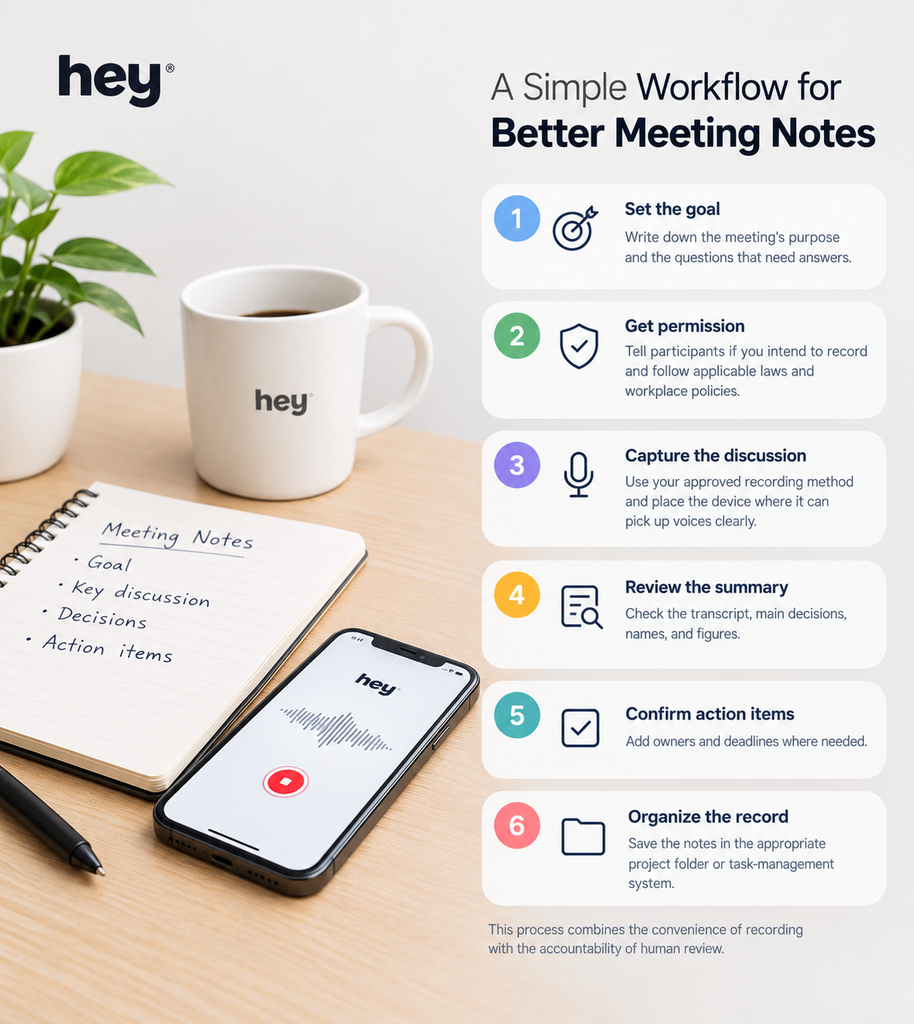
- A Simple Workflow for Better Meeting Notes
- Pricing, Plans, and Practical Considerations
- Pros and Cons
- Save More on Every Order – Grab the Latest Coupons & Deals
- Frequently Asked Questions
- Can Hey Pocket automatically create meeting notes?
- Is an AI voice recorder better than handwritten notes?
- Does Hey Pocket work without an internet connection?
- Should I tell people before recording a meeting?
- Is Hey Pocket worth considering for everyday work?
- Conclusion
Taking meeting notes can feel like a second job. While colleagues discuss deadlines, decisions, and new ideas, you may be busy writing instead of participating. Important details can get lost, and handwritten notes often need extra time to organize after the meeting ends. Smarter meeting notes with an AI voice recorder offer another approach: capture the conversation and use software to help turn it into information you can review later.
Hey Pocket is a dedicated AI voice recorder designed to capture conversations and create transcripts, summaries, and action items through its companion app. Instead of relying entirely on manual notes, users can focus more on the discussion and review the important points afterward. It is worth understanding how this workflow works, what the device offers, and when a traditional note-taking method may still be the better choice.
Save More on Every Order – Grab the Latest Coupons & Deals:
Why Smarter Meeting Notes Matter
Useful meeting notes do more than preserve what people said. They help teams remember decisions, identify responsibilities, and follow up on agreed tasks. When notes are incomplete or difficult to search, employees may need to revisit recordings, ask colleagues for clarification, or spend additional time reconstructing a discussion.

A more organized note-taking process can help you:
- Capture key points without writing every sentence.
- Review decisions after a meeting.
- Identify tasks and follow-up questions.
- Search previous conversations when details are needed.
- Share a clearer summary with relevant colleagues.
AI tools can support this process, but they do not replace judgment. Always check important names, figures, deadlines, and commitments before distributing meeting notes.
How Hey Pocket Helps With AI Note-Taking
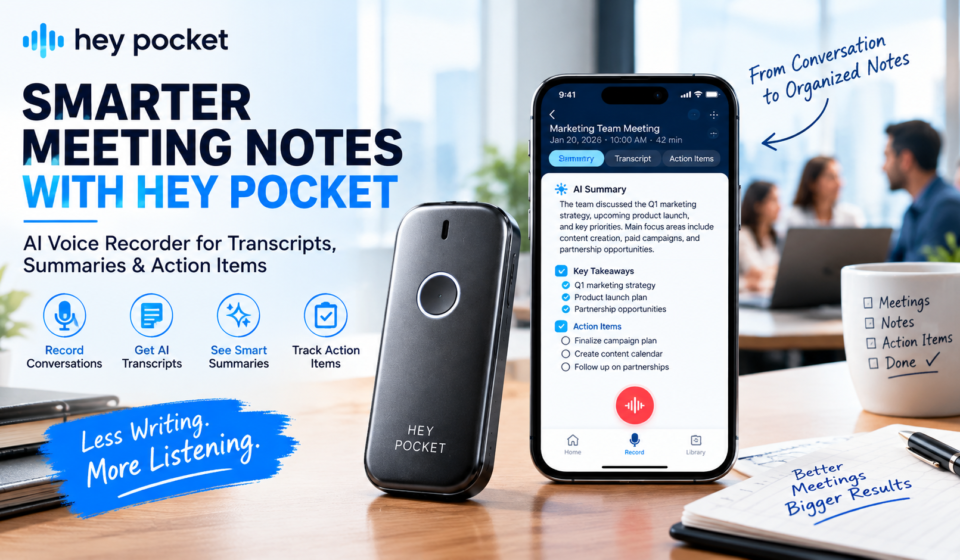
Hey Pocket is a recording device that works with a companion app. With one button, users can record conversations and review notes in the app afterward.
It provides transcripts, AI summaries, action items, and mind maps, with support for over 120 languages. It may be useful for meetings, interviews, lectures, and keeping searchable conversation records.

A dedicated recorder also separates recording controls from the phone’s screen. This can reduce the need to unlock a device and navigate an app each time you want to capture a discussion.
Key Features to Consider
1. One-Button Recording
Hey Pocket is designed to start recording with a dedicated button. This may be convenient when you regularly capture conversations and want fewer steps before recording begins. The device can record independently, storing audio on its onboard storage until it syncs through the app.
2. AI Transcription
Transcription converts spoken words into text. This makes it easier to search a conversation, review specific points, and revisit details without listening to an entire recording again.
Hey Pocket advertises support for over 120 languages. Actual transcription quality can vary with background noise, accents, specialist vocabulary, and recording conditions, so review the text before relying on it.
3. Summaries and Action Items
Long discussions often contain a mix of ideas, decisions, questions, and unrelated conversation. AI summaries can help condense that information, while action-item extraction may highlight tasks and next steps.
These outputs are useful starting points, not guaranteed records of every decision. Confirm task owners and deadlines with meeting participants before treating the generated list as final.
4. Storage and Battery
The official product information lists 64GB of onboard storage and battery life of up to four days of active use, depending on usage. It also says the device can record offline and sync when connected through the app.
These features may suit people who record frequently, although actual battery performance and syncing behavior depend on how the device is used.
A Simple Workflow for Better Meeting Notes
You do not need to automate every part of note-taking to improve your process. Try this practical routine:
- Set the goal: Define the meeting’s purpose and key questions.
- Get permission: Inform participants before recording.
- Record the discussion: Capture voices clearly using your approved device.
- Review the notes: Verify transcripts, decisions, names, and figures
Pricing, Plans, and Practical Considerations
Hey Pocket’s website displays different offers and subscription details across its pages. The device has been listed at different promotional prices, and advanced features may be tied to a paid plan depending on the offer. Because pricing and plan inclusions can change, check the official store for the current device price, included features, trial terms, and recurring charges before ordering.
Also consider whether you need a separate device. If your existing phone or computer already provides reliable recording and transcription, a dedicated recorder may not be necessary. Its value depends on recording frequency, preferred workflow, and which AI features you will actually use.
Pros and Cons
Potential advantages
- Dedicated button for quick recording.
- Transcripts, summaries, action items, and mind maps.
- Onboard storage and offline recording.
- May reduce manual note-taking during discussions.
Potential disadvantages
- Requires carrying and charging extra hardware.
- AI transcripts and summaries can contain errors.
- Some advanced features may involve subscription costs.
- Recording requires appropriate consent and careful handling of sensitive information.
Save More on Every Order – Grab the Latest Coupons & Deals:
Frequently Asked Questions
Can Hey Pocket automatically create meeting notes?
It advertises transcripts, AI summaries, action items, and mind maps generated from recordings. Review the results to verify important details.
Is an AI voice recorder better than handwritten notes?
Not in every situation. AI recording can help with longer discussions, while handwritten notes are useful for brief meetings, personal reflections, and situations where recording is inappropriate.
Does Hey Pocket work without an internet connection?
The official product information says it can record offline and sync when you reconnect and open the app. Check current setup requirements before relying on this feature.
Should I tell people before recording a meeting?
Yes. Obtain appropriate consent and follow local recording laws, organizational rules, and confidentiality requirements.
Is Hey Pocket worth considering for everyday work?
It may suit people who regularly attend meetings and want searchable transcripts and organized summaries. Occasional users may find existing phone or computer tools sufficient.
Conclusion
Smarter meeting notes are about capturing useful information, not simply producing more text. A reliable process combines clear recording, accurate review, organized action items, and appropriate privacy practices. Hey Pocket may help frequent meeting participants turn conversations into transcripts, summaries, and next steps without relying entirely on handwritten notes.
Before choosing an AI voice recorder, compare its features and total cost with the tools you already own. If a dedicated recording workflow fits your needs, explore the latest details on the official Hey Pocket website and decide whether its features justify the additional device.