Table Of Content
- Save More on Every Order – Grab the Latest Coupons & Deals
- Why Does a VPN Slow Down Internet Speed?
- 5 Factors That Affect VPN Connection Speed
- 1. VPN Server Distance
- 2. Network Congestion
- 3. VPN Protocol
- 4. Your Regular Internet Connection
- 5. Device Performance
- How NordVPN Fits the Topic
- How to Test Your VPN Speed
- Practical Tips for Better VPN Performance
- Save More on Every Order – Grab the Latest Coupons & Deals
- Frequently Asked Questions
- Does a VPN always slow down the internet?
- Can a VPN make my internet faster?
- Which VPN protocol is best for speed?
- Does a VPN affect online gaming?
- How can I tell whether my VPN is causing slow internet?
- Related Resources
- Conclusion
Does a VPN slow down internet speed? Yes, a virtual private network can reduce your connection speed because it encrypts your internet traffic and routes it through a VPN server. However, the slowdown varies depending on your internet connection, server location, VPN protocol, and device performance. In many cases, you can reduce the impact by adjusting a few settings.
Understanding these factors is especially useful if you regularly stream videos, play online games, download files, or attend video meetings. A slower connection does not automatically mean your VPN is unreliable. Sometimes, the problem comes from network congestion or your regular internet service. This guide explains what affects VPN speed, how to test your connection, and how NordVPN’s speed-focused features may help you maintain a smoother online experience.
Save More on Every Order – Grab the Latest Coupons & Deals:
Why Does a VPN Slow Down Internet Speed?
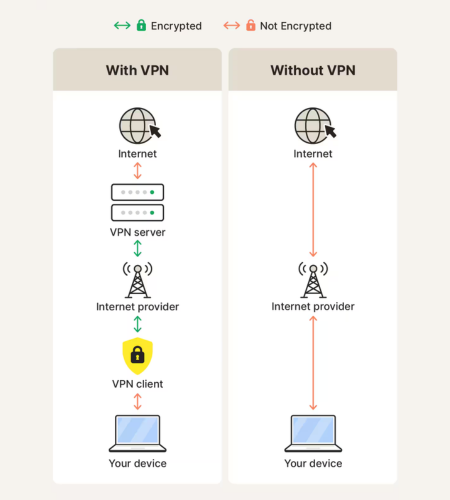
A VPN creates an encrypted connection between your device and a remote server. Your internet traffic travels through that server before reaching its destination. This additional routing and encryption can introduce latency or reduce download and upload speeds.
Your VPN speed depends on server distance, server load, device performance, and your original internet connection.
A VPN does not always make browsing noticeably slower, but no provider can guarantee identical speeds for every user, device, and location.
5 Factors That Affect VPN Connection Speed
1. VPN Server Distance
Server distance can influence both latency and connection performance. When you connect to a server far from your physical location, your data generally has to travel farther, increasing the time required for information to move between your device and its destination.
What you can do: Choose a nearby VPN server when your priority is speed. Select a more distant location only when you need a particular virtual location for your online activity.
2. Network Congestion
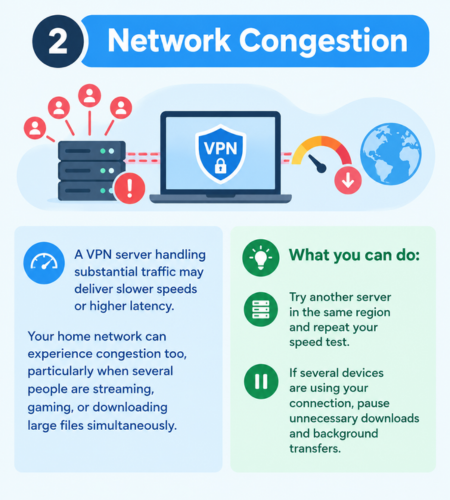
A VPN server handling substantial traffic may deliver slower speeds or higher latency. Your home network can experience congestion too, particularly when several people are streaming, gaming, or downloading large files simultaneously.
What you can do: Try another server in the same region and repeat your speed test. If several devices are using your connection, pause unnecessary downloads and background transfers.
3. VPN Protocol
A VPN protocol determines how your device establishes and maintains its secure connection. Different protocols can produce different results depending on the device, network conditions, and server.
NordVPN offers NordLynx, a protocol built around WireGuard and designed for speed and efficiency. OpenVPN is another option, although performance varies with its configuration and connection conditions.
What you can do: Check your VPN application’s protocol settings. If available and suitable for your needs, test NordLynx against another supported option while keeping your server and testing conditions consistent.
4. Your Regular Internet Connection
A VPN cannot eliminate limitations in your existing broadband or mobile connection. If your internet is already slow without a VPN, the VPN may not be the main cause of poor performance.
Your router, Wi-Fi interference, service-provider congestion, and internet plan can all affect results.
What you can do: Test your connection with the VPN disconnected before changing VPN settings. This helps establish whether the underlying connection is responsible for the slowdown.
5. Device Performance
Older devices, limited processing power, outdated software, and bandwidth-heavy background applications may affect connection performance. VPN encryption requires processing resources, while downloads, cloud backups, and updates can consume available bandwidth.
What you can do: Close unnecessary applications, update your VPN software, restart your router if needed, and try a wired Ethernet connection when practical.
How NordVPN Fits the Topic
NordVPN is a commercial VPN service designed to provide encrypted connections and additional online privacy features. Its NordLynx protocol is particularly relevant to users who want to balance connection speed with VPN protection.
When evaluating NordVPN for your needs, consider these features:
- NordLynx protocol: Designed to provide efficient VPN connections using WireGuard technology.
- Multiple server locations: Gives users options for choosing a location closer to their physical location.
- Connection settings: Lets users review supported protocols and troubleshoot performance.
- Encrypted traffic: Helps protect data in transit between your device and the VPN server.
These features may help reduce avoidable slowdowns, but your results will still depend on your internet provider, location, device, and chosen server. Review the current service details before selecting a subscription.
How to Test Your VPN Speed
A before-and-after speed test shows how a VPN affects your internet speed. Test your connection without the VPN, then connect to a nearby server and repeat the test on the same device to compare download speed, upload speed, and ping.
For accurate results, test different nearby servers or VPN protocols and compare multiple results. Keep other network activity as consistent as possible for a fair comparison.

Practical Tips for Better VPN Performance
If your VPN connection feels slow, try these steps in order:
- Switch to a nearby server with a stable connection.
- Test NordLynx if your VPN app supports it.
- Close applications that use substantial bandwidth.
- Restart your router and device if the connection remains unusually slow.
- Use Ethernet instead of Wi-Fi when possible.
- Check your internet service for outages or performance issues.
- Repeat your speed test at another time to check for temporary congestion.
Avoid disabling essential security protections simply to gain speed. A modest performance improvement is rarely worth weakening your device’s security.
Save More on Every Order – Grab the Latest Coupons & Deals:
Frequently Asked Questions
Does a VPN always slow down the internet?
No. A VPN can reduce speed, but the impact varies. Some connections experience only a small difference, while others encounter more noticeable slowdowns because of server distance, congestion, or device limitations.
Can a VPN make my internet faster?
In certain circumstances, yes. If an internet provider throttles specific types of traffic, a VPN may prevent the provider from identifying that activity and applying activity-specific restrictions. However, this is not guaranteed, and a VPN cannot fix every internet speed problem.
Which VPN protocol is best for speed?
NordLynx is a speed-focused option offered by NordVPN. Its actual performance depends on your network, device, server location, and configuration.
Does a VPN affect online gaming?
It can increase ping or introduce additional latency. Connecting to a nearby server and testing different supported protocols may help. Your regular internet connection and the route to the gaming server remain important.
How can I tell whether my VPN is causing slow internet?
Run comparable speed tests with the VPN disconnected and connected. Compare download speed, upload speed, and ping. Repeat the tests to distinguish a consistent difference from temporary network fluctuations.
Related Resources
For more information about VPN features, pricing considerations, safety, and overall value, explore the existing NordVPN review on Reviewness. It provides a broader context for evaluating the service alongside your speed and privacy requirements.
Conclusion
Does a VPN slow down internet speed? It can, but the result depends on more than encryption alone. Server distance, congestion, protocol choice, your regular connection, and device performance all matter.
Start by testing your baseline internet speed, connecting to a nearby server, and checking your VPN protocol. NordVPN’s NordLynx technology may help users seeking an efficient connection, although individual results will vary. Explore the official NordVPN website to review its current features and decide whether they suit your browsing, streaming, gaming, and privacy needs.