


Table Of Content
- Save More on Every Order – Grab the Latest Coupons & Deals
- What Is a Domain Name?
- What Is Web Hosting?
- What Is WordPress?
- Domain vs Hosting vs WordPress: The Main Differences
- How Bluehost Fits Into Your Website Setup
- How to Put the Three Pieces Together
- Save More on Every Order – Grab the Latest Coupons & Deals
- Frequently Asked Questions
- Do I need a domain and hosting for WordPress?
- Can I buy a domain without hosting?
- Is WordPress a hosting company?
- Can I get a domain and hosting from Bluehost?
- Which should I buy first: a domain or hosting?
- Conclusion
Starting a website can feel confusing when you encounter terms like domain name, web hosting, and WordPress. They are closely connected, but each serves a different purpose. Understanding the difference between a domain vs hosting vs WordPress helps you make informed decisions before spending money on website tools or services.
Think of your website as a house. The domain is its address, hosting is the space where its files live, and WordPress is the software you use to create and manage its content. You generally need all three for a self-hosted WordPress website. Once you understand how they fit together, choosing a setup becomes much easier. Hosting providers such as Bluehost offer domain and WordPress hosting options in one place, which may simplify the process for beginners.
Save More on Every Order – Grab the Latest Coupons & Deals:
What Is a Domain Name?
A domain name is the web address people type into a browser to find your website. For example, in “example.com,” the domain gives visitors a recognizable way to reach your site without having to remember a server’s numerical IP address.
Your domain helps establish your website’s identity. A clear, memorable name can make your site easier to recognize and share.
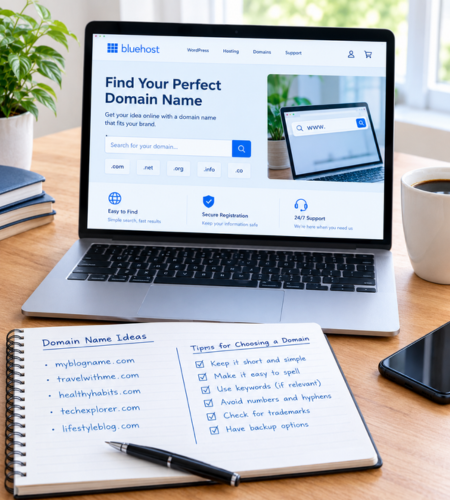
When choosing a domain:
- Keep it simple and easy to spell.
- Choose a name relevant to your website or brand.
- Avoid unnecessary numbers and confusing punctuation.
- Check availability before registering it.
- Review registration and renewal costs.
A domain name does not automatically contain your website’s pages, images, or blog posts. It directs visitors to the online location where your website is hosted.
What Is Web Hosting?
Web hosting is a service that stores your website’s files and makes them available over the internet. These files may include images, pages, themes, databases, and other resources required for your site to function.
Without hosting for a self-hosted website, your domain would not have a website’s content to direct visitors to.

Hosting plans differ in storage, performance resources, security features, backup options, support, and cost. Beginners often start by comparing shared or WordPress-focused hosting plans, while larger websites may eventually need more resources.
Before selecting a hosting provider, check:
- The features included in the plan.
- Security and backup arrangements.
- Available customer support.
- Introductory and renewal prices.
- Whether the service supports your chosen website platform.
A low starting price may look attractive, but the renewal rate and included features matter when calculating your long-term website budget.
What Is WordPress?
WordPress is website publishing software that lets you create, edit, organize, and publish content. You can use it to build a blog, business website, portfolio, publication, or online store.
With WordPress, you can manage pages and posts through an administration dashboard. Themes control much of your site’s appearance, while plugins can add functionality such as contact forms, search optimization tools, and ecommerce features.
WordPress itself is not the same thing as web hosting or a domain name.
For a self-hosted WordPress.org website, you obtain hosting, connect a domain, and install the WordPress software. WordPress.com is a different option that offers a hosted service, so the setup and responsibilities depend on the plan you choose.
Domain vs Hosting vs WordPress: The Main Differences
The easiest way to understand the difference is to look at each component’s role.
Domain name: The address visitors use to reach your website.
Web hosting: The service that stores and delivers your website’s files.
WordPress: The software you use to build and manage website content.
For example, imagine you want to launch a food blog. You register a domain that matches your blog’s name, purchase hosting for your website’s files, and use WordPress to publish recipes, photographs, and articles.
These components work together, but they are not interchangeable. Buying a domain alone does not create a complete website, and installing WordPress does not mean you automatically own a domain or have arranged separate hosting.
How Bluehost Fits Into Your Website Setup
Bluehost offers web hosting and WordPress hosting options, along with domain registration services. Depending on the current plan and its terms, eligible hosting packages may include a domain for the first year, SSL, and WordPress setup tools.
One provider can simplify website setup by combining domain registration and hosting in one account.

However, compare the details before choosing a plan. Check the billing term, renewal rate, domain eligibility, included security features, backup arrangements, and support options. Included features and promotional offers can vary, so verify the current terms before purchasing.
Bluehost may suit beginners who prefer a guided setup process, but it is still worth comparing alternatives based on your budget and website requirements.
How to Put the Three Pieces Together
If you are building a self-hosted WordPress website, follow this general sequence:
- Choose a website name and check whether the matching domain is available.
- Select a hosting provider and a plan suitable for your expected needs.
- Register a new domain or connect a domain you already own.
- Install WordPress through your host’s setup tools or follow the appropriate installation instructions.
- Choose a theme, configure essential settings, and create your first pages.
- Check that your domain points to the correct website and test your site before sharing it.
Some providers combine domain registration, hosting, and WordPress installation into a guided process. The exact steps depend on the provider and plan.
Save More on Every Order – Grab the Latest Coupons & Deals:
Frequently Asked Questions
Do I need a domain and hosting for WordPress?
For a self-hosted WordPress.org website, you generally need a domain and a hosting service. WordPress.com offers hosted plans, so you may not need to arrange separate hosting.
Can I buy a domain without hosting?
Yes. You can register a domain separately and connect it to a hosting provider later. Registering a domain by itself does not create a complete website.
Is WordPress a hosting company?
WordPress is website publishing software. WordPress.com provides a hosted website service, while WordPress.org provides the software commonly used with a hosting provider of your choice.
Can I get a domain and hosting from Bluehost?
Bluehost offers domain registration and hosting options. Some eligible hosting plans include a domain for the first year, subject to the provider’s current terms and domain restrictions.
Which should I buy first: a domain or hosting?
You can choose either first. Many beginners decide on a domain name before comparing hosting plans, while some providers let you select and register a domain during the hosting checkout process.
Conclusion
Understanding domain vs hosting vs WordPress makes website setup less intimidating. Your domain gives visitors an address, hosting stores and delivers your site’s files, and WordPress provides the tools to create and manage its content.
For a self-hosted website, these elements need to work together. Take time to choose a suitable domain, compare hosting features and renewal costs, and select the website platform that matches your goals. If you want to manage hosting and domain services in one place, explore Bluehost’s current WordPress hosting options and review the terms before making a decision.









